01 Selected work · Case study 04 of 04
U2U events app
Our team of four was assigned to design and build a phone app for UCL that prioritises student connectivity. We created U2U: one place for students to find, buy and resell event tickets. I managed the ten-week project as Scrum Master and Product Owner.
The brief
Prototype a web or phone app that supports "Student Connectivity", simple enough to deliver now and built to be extended in later iterations.
The app had to serve more than one type of user. The team had to work in Agile throughout, from requirements and analysis to design, implementation and testing, and every member had to work on every part. Meetings had to be recorded in Trello, with attendance, who took which task and reviews of each member's work. The report was capped at 25 pages and carried 40% of the module mark.
Overview
UCL events are scattered across the Students' Union website, social media and newsletters. No single place lets students find an event, buy a ticket and resell it when plans change.
We interviewed the two groups who run events. A society president organised and promoted through the Students' Union website and social media, and found it hard to collaborate with other universities and manage ticketing. A faculty member relied on newsletters and the Students' Union platform, and wanted one interactive platform for events across universities.
Existing tools each covered part of the job. Eventbrite is built for events in general, not university life. UCL Go is the default for official events but has no ticket resale or event calendar. Tixtu sells tickets for some universities and students' unions, without resale, personalised feeds or links to academic systems.
Solution
U2U: one app where students find, buy and resell tickets, and organisers run their events.
Everyone signs in with UCL credentials. The Students' Union database confirms society committee members as admins and the UCL database confirms faculty; society presidents can hold a student account and an admin account.
Students find events through a home feed of popular and recommended events, a search tab, or a map of events within a set radius, and filter by category, date and price. They buy from the organiser or from a student reselling, with the seller's rating shown, and every ticket lands in a built-in calendar. From their profile they resell tickets and refer friends.
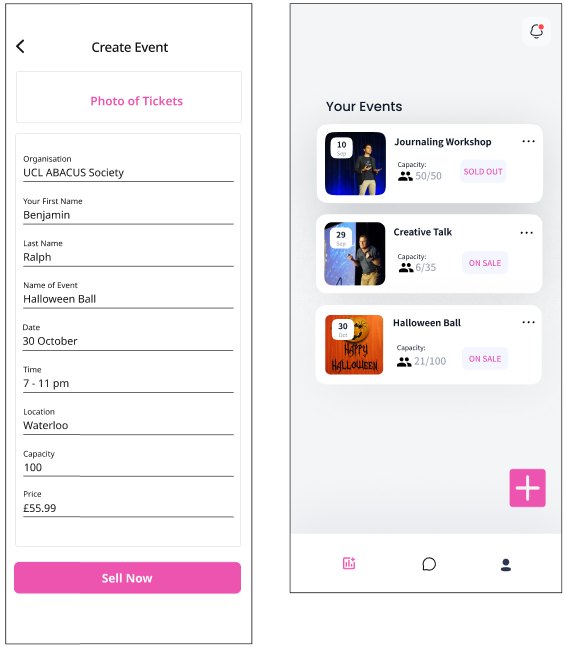
Admins get a dashboard of their events with sales and status, such as "Sold Out" or "On Sale". They create and edit events, receive sales notifications and message other admins to organise events together.
How I ran it
As Scrum Master and Product Owner, I managed the project. I ran the planning and the daily stand-ups, kept the team aligned, and gathered, prioritised and managed the requirements.
The brief required Agile throughout and every member on every part of the build. My job was to keep four people working to one plan for ten weeks.
- Method. We chose Scrum over Kanban because its sprints suited iterative development and its routines built collaboration and accountability. The ten-week project ran as a series of sprints.
- Planning cadence. I facilitated sprint planning at a weekly meeting: ten between 26 January and 29 March 2024, about 24 hours in all. Each was minuted with its date, length, topics and attendance.
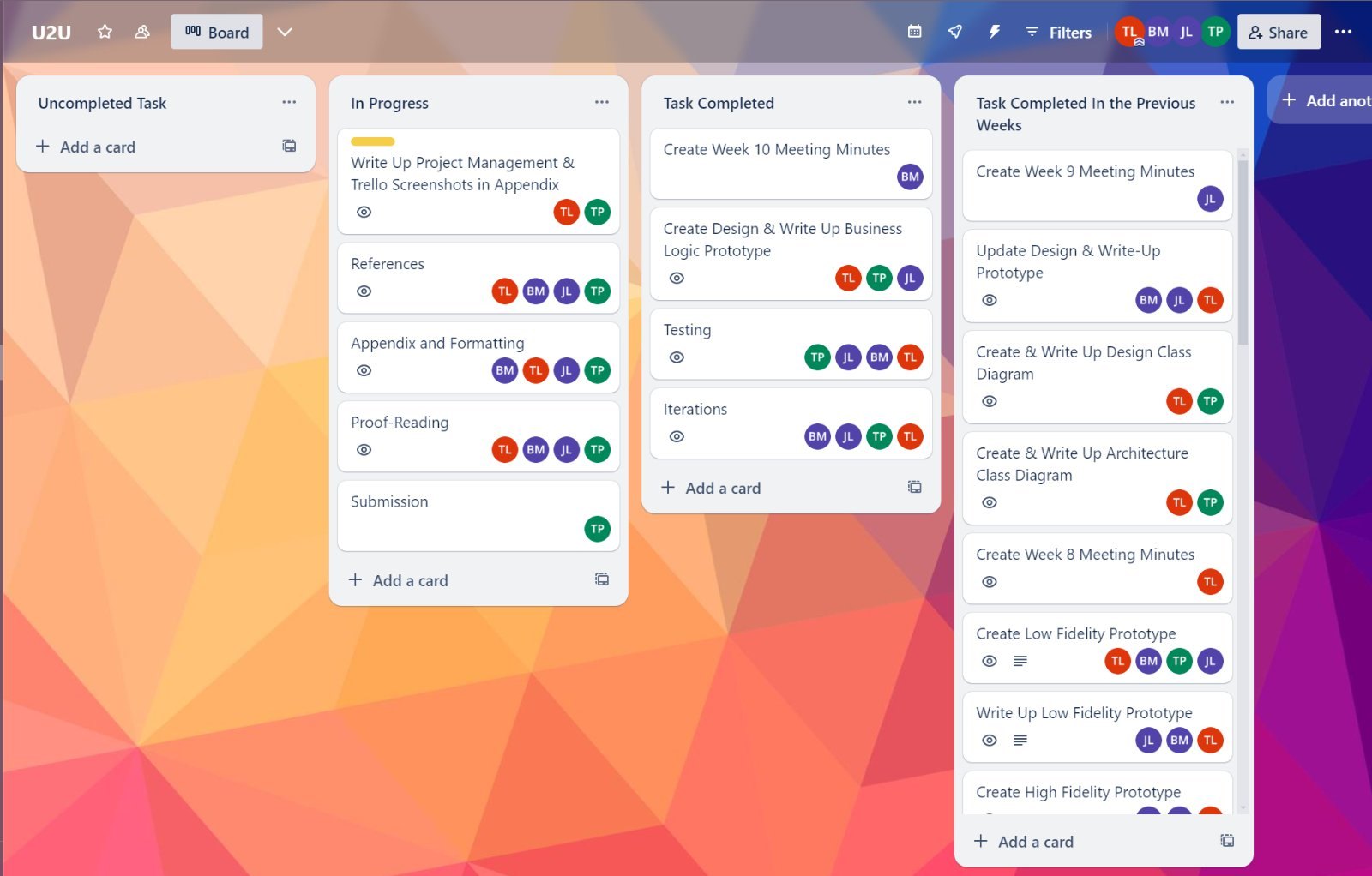
- Progress tracking. Every task lived on a Trello board in four columns: Uncompleted Tasks, In Progress, Task Completed and Task Completed in Previous Weeks. Each card carried its owners' initials, so anyone could see who held what.
- Dependencies. A yellow PRIORITY label flagged urgent tasks that later work depended on, so those were cleared first.
- Daily stand-up. I moved the stand-up into a WhatsApp group. Each day, everyone texted three answers: what did I do yesterday, what will I do today, and what obstacles am I facing? Obstacles could be dealt with promptly, without waiting for the weekly meeting.
- Requirements and backlog. As Product Owner, I gathered requirements from two stakeholder interviews and a survey across the UCL community, prioritised them and managed the backlog. Each user story carried acceptance criteria, estimation points for effort and scheduling, and a priority that set the build order.
- Responding to change. When the week 7 prototype workshop showed what needed fixing, "Update Design & Write up Prototype" went straight into week 8's In Progress column.
- Scope. The brief asked for a simple first version that could be extended. The load balancer and web services were left for a later iteration, and testers' requests became the backlog for the next one.
- Tools. We planned weekly tasks in Google Docs, which everyone knew, while the team learned Trello, then moved all task management to Trello.
| Meeting | Date | Length | Focus | Attended |
|---|---|---|---|---|
| 01 | 26 Jan | 90 min | Set up the Trello board; brainstormed the app and its vision | 3 of 4 |
| 02 | 2 Feb | 120 min | Wrote the introduction; researched competitors | 4 of 4 |
| 03 | 9 Feb | 180 min | Finished the introduction; high-level product vision and competitor list | 4 of 4 |
| 04 | 16 Feb | 30 min | Finished the detailed product vision | 4 of 4 |
| 05 | 23 Feb | 90 min | Wrote the interview and survey questions | 3 of 4 |
| 06 | 1 Mar | 100 min | Reviewed the interview results; sent out the survey | 3 of 4 |
| 07 | 8 Mar | 240 min | Functional and non-functional requirements, user stories, personas | 3 of 4 |
| 08 | 15 Mar | 240 min | High-level and detailed class diagrams; low- and high-fidelity prototypes | 4 of 4 |
| 09 | 22 Mar | 180 min | Architecture and design class diagram; refined the prototype; high-fidelity testing; business-logic prototype | 3 of 4 |
| 10 | 29 Mar | 180 min | Finished implementation, testing and next iterations; finalised the report | 3 of 4 |
| Total | 10 weeks | 24 h |
Meetings ran from 30 minutes to four hours, and all four of us made four of the ten. The written stand-up kept whoever missed one up to date.
How the work was tracked
 Open full size
The week 10 board. Every task sits in one of four columns with its owners' initials; mine are BM. Yellow PRIORITY labels mark work that other tasks depend on.
What we built
As the brief required, all four of us worked on every stage, from requirements to tested code.
- Requirements. Two interviews, then a survey across the UCL community to test which features people valued. This gave us two detailed personas, a society president and a faculty member, and 15 functional and 7 non-functional requirements, such as supporting 10,000 users at once.
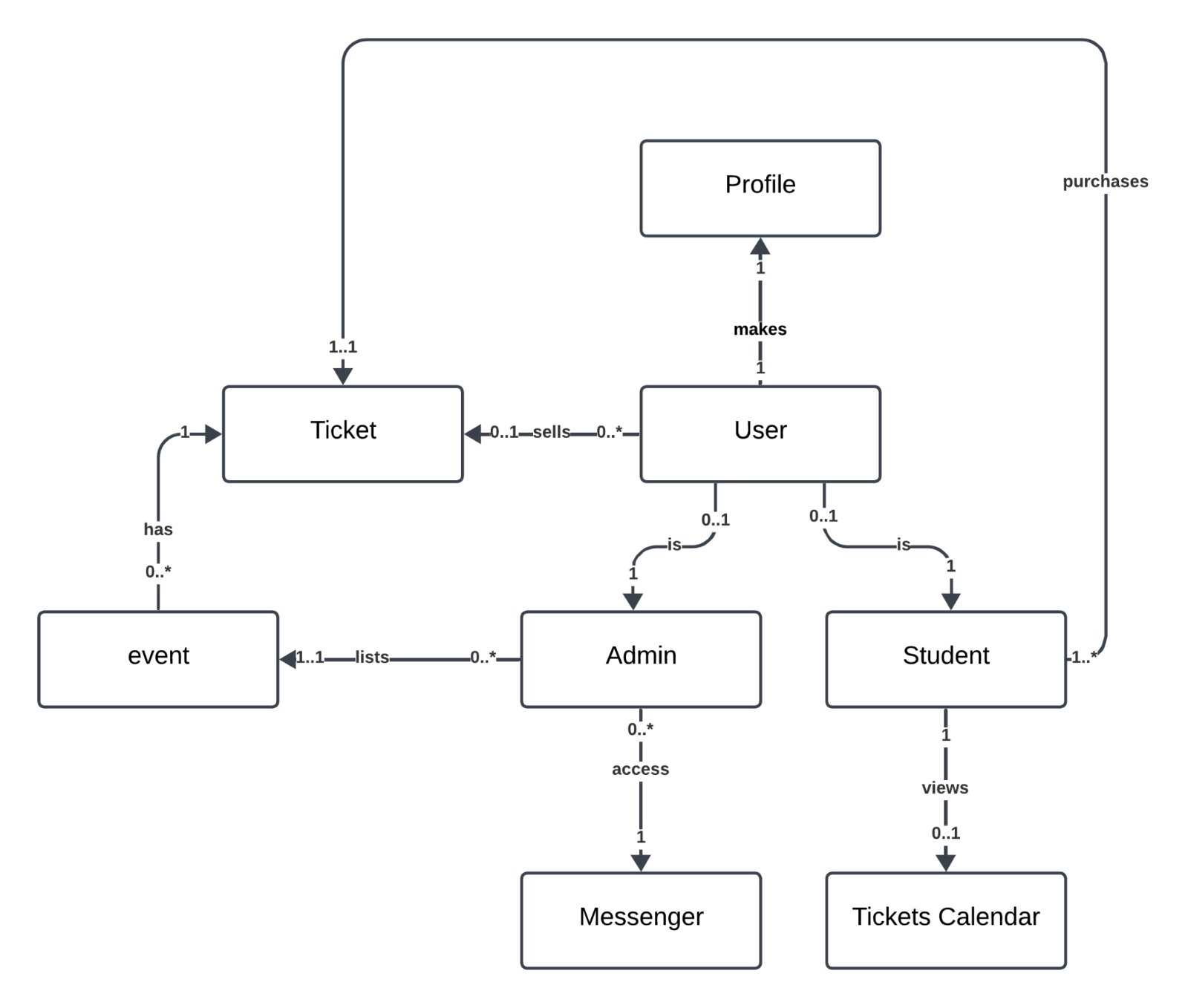
- Analysis. A class diagram of eight classes with their multiplicities, for example one profile per user and one event per ticket, then a detailed version with each class's attributes and operations.
- Design. The classes grouped into five modules: authentication and user management, messaging, event management, ticketing, and calendar. Each was kept separate from the others so it could be changed on its own.
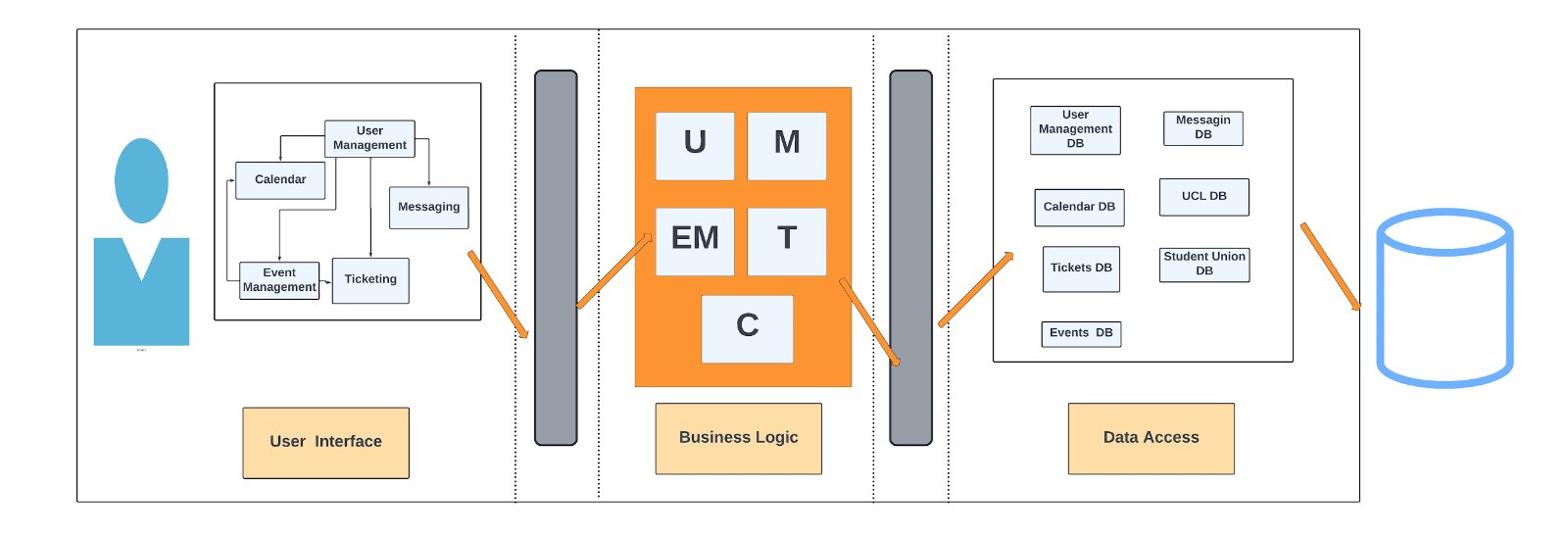
- Architecture. A three-tier design: interface, business logic and data access, drawing on UCL and Students' Union databases.
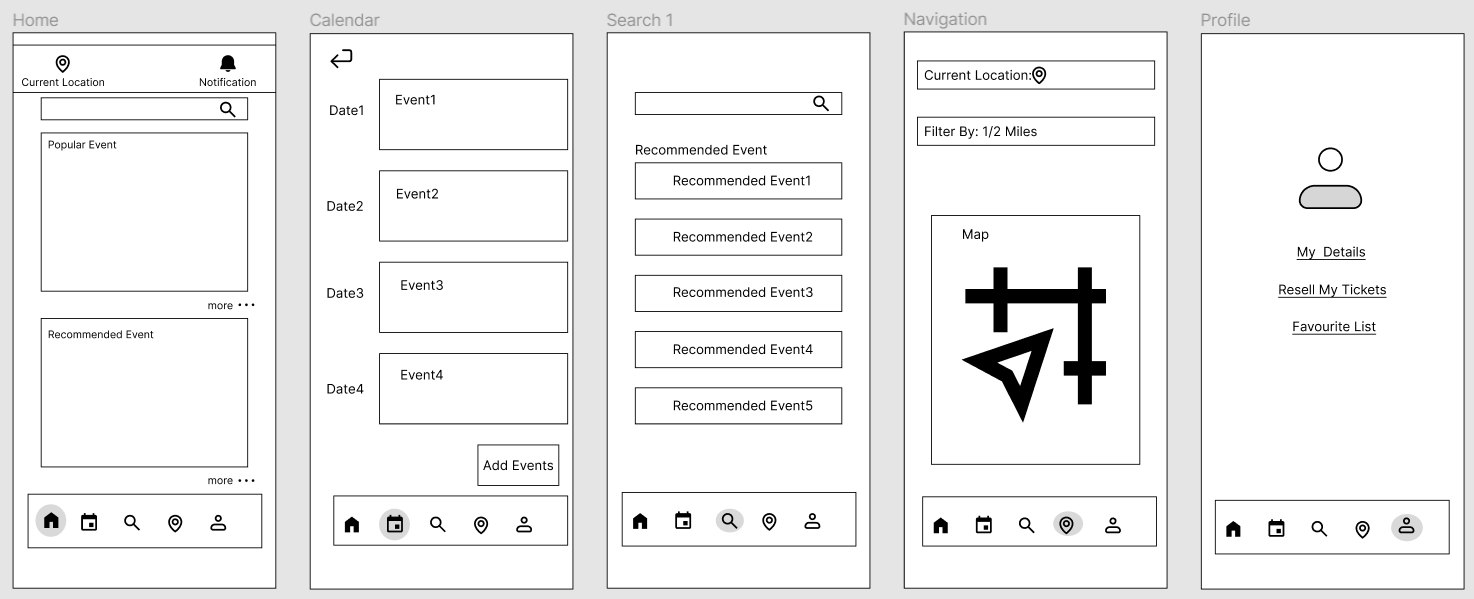
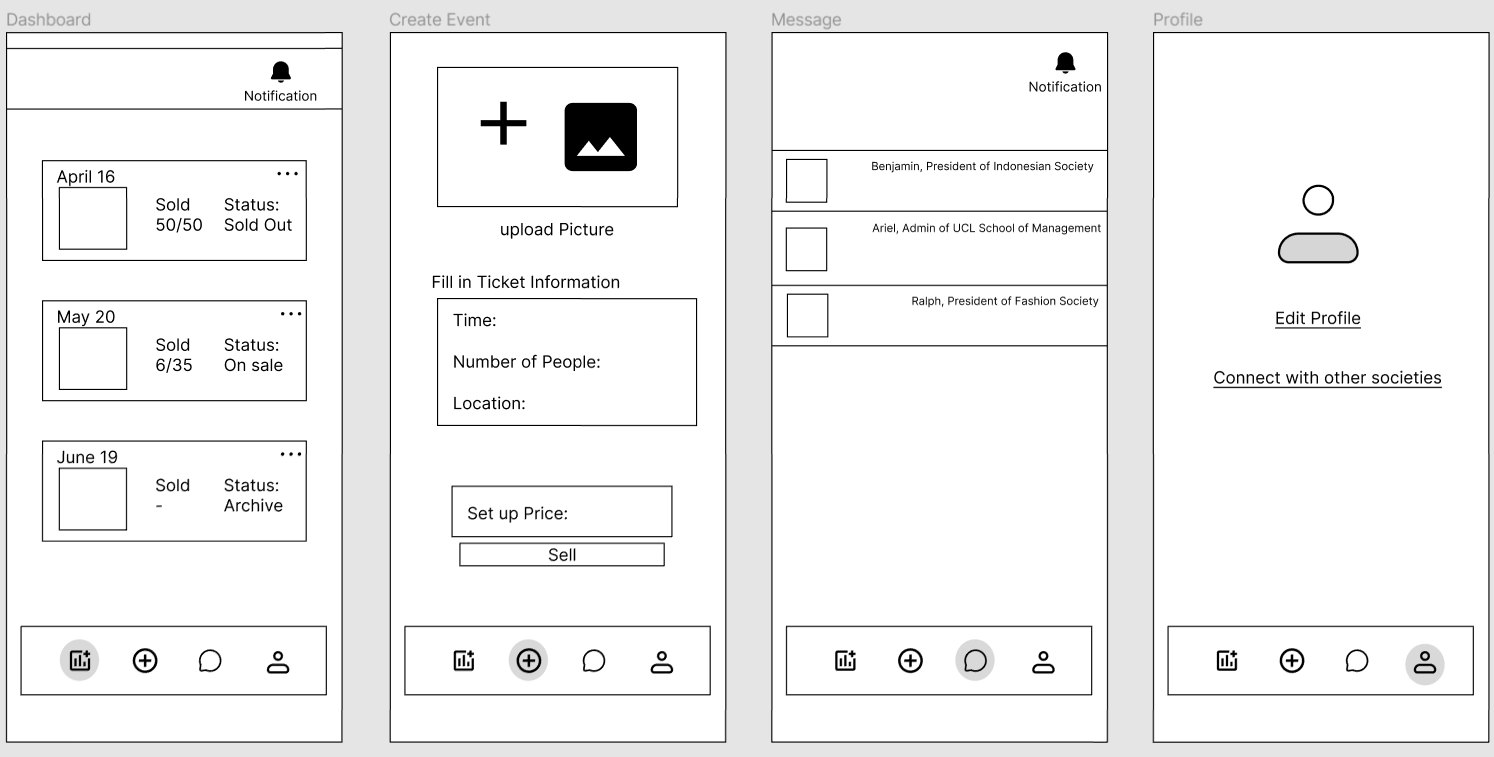
- Prototypes. Low-fidelity wireframes of nine tabs, five for students and four for admins, then an interactive high-fidelity prototype in Figma.
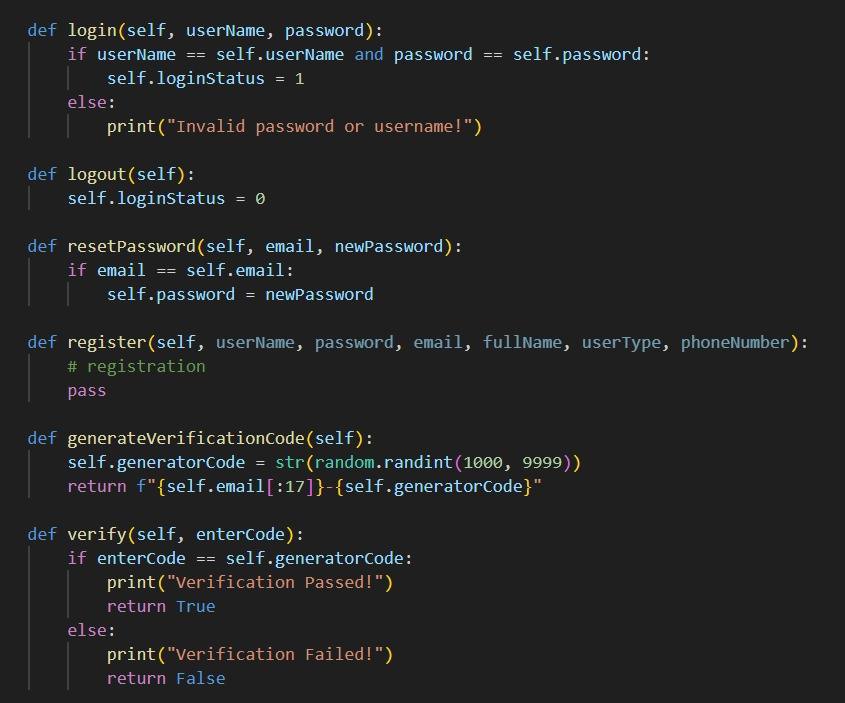
- Implementation and testing. Python business logic for identity verification, event notifications and ticket resale, unit-tested with PyUnit. Testing found that randomly generated user IDs changed on every run and came out as numbers, not text; seeding the generator and converting the ID fixed both. We also tested email verification with correct and incorrect four-digit codes.
Wireframes and design
 Open full size
Five student tabs: home, calendar, search, location and profile.
 Open full size
Four admin tabs: tracking, adding events, messenger and profile.
 Open full size
Eight classes. Student, Admin and Profile are subclasses of User.
 Open full size
Interface, business logic and data access, drawing on UCL and Students' Union databases.
Outcomes
- High-fidelity testers who found it intuitive
- 17/20
- Low-fidelity testers who found it user-friendly
- 6/7
- Requirements documented, functional and non-functional
- 22
The high-fidelity prototype
 Open full size
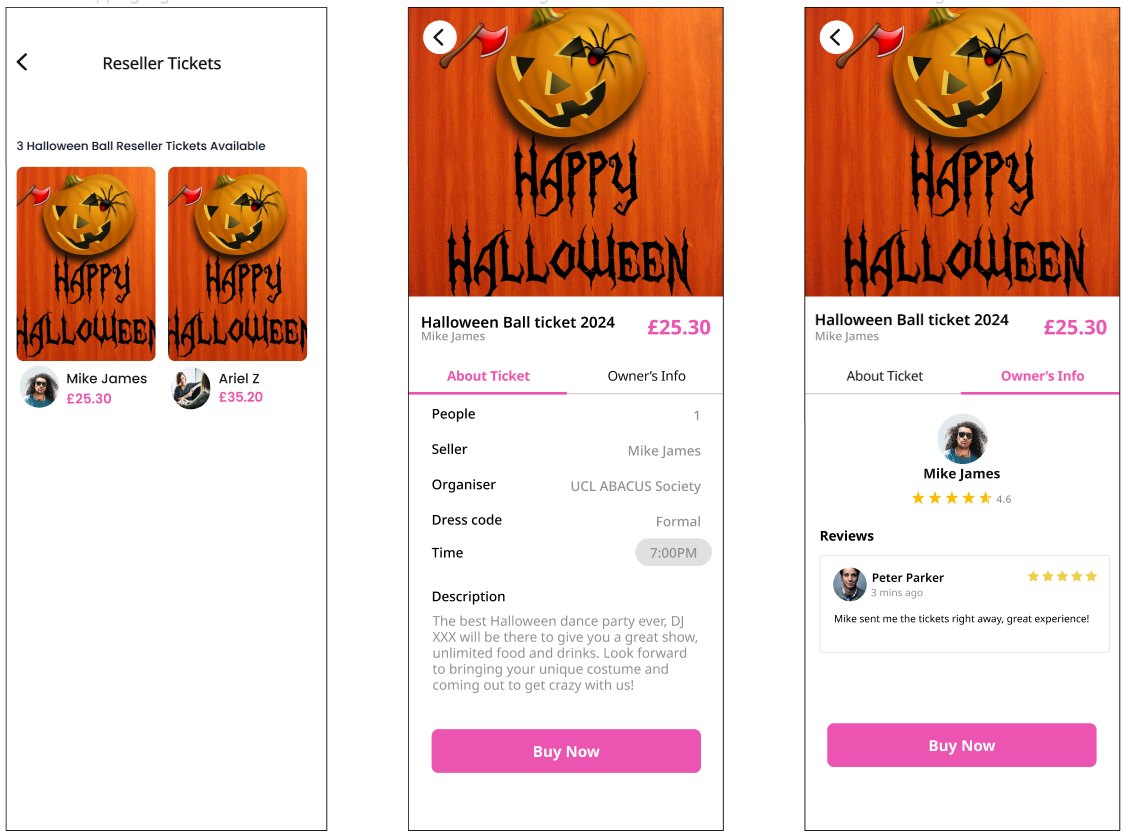
Buy from the organiser, or from a student who can no longer go, with the seller's rating shown.
 Open full size
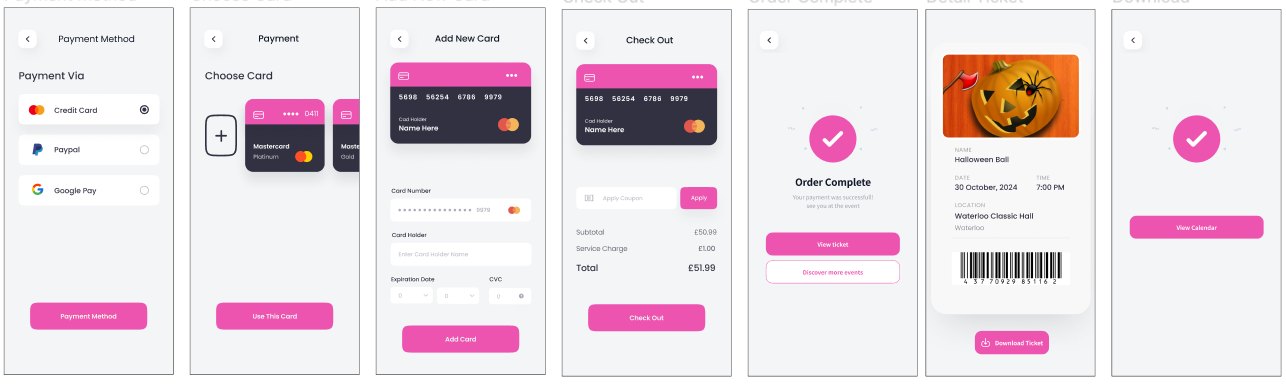
Pay, download the ticket, and the event appears in the calendar.
 Open full size
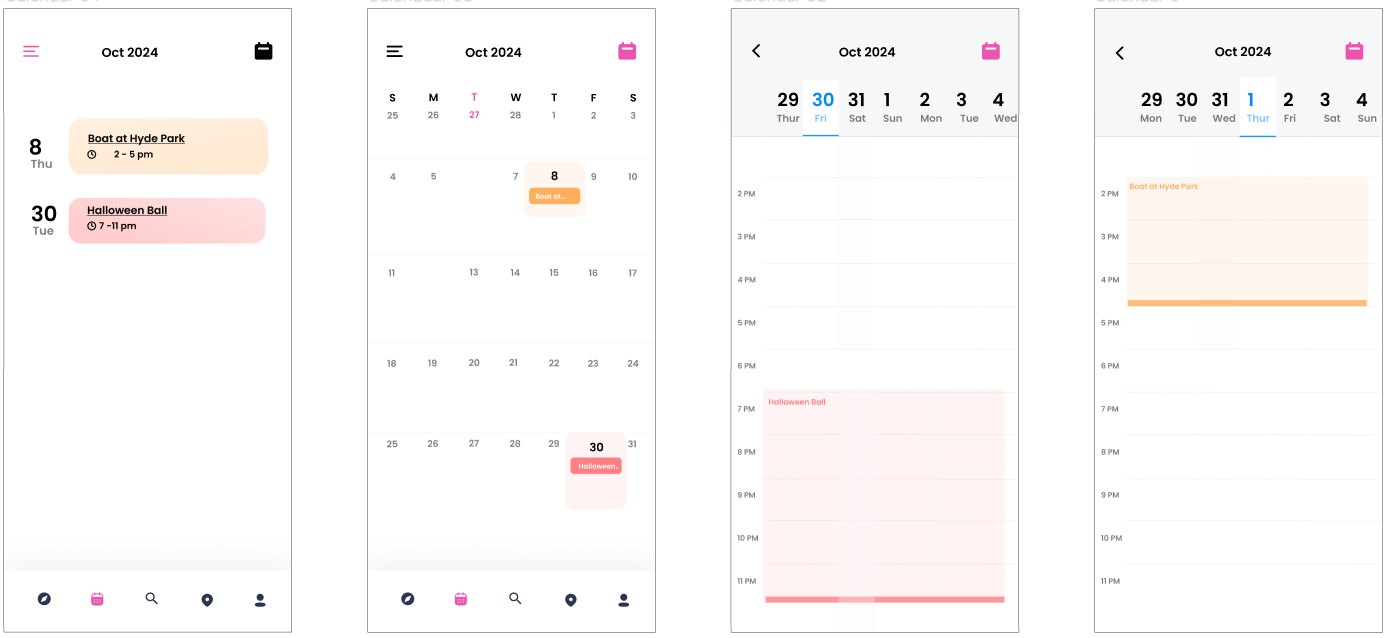
List, month and week views of every booked event.
 Open full size
Admins add events and track sales for the ones they run.
 Open full size
User methods in Python, from registration to email verification, unit-tested with PyUnit.
Initial findings
Two rounds of user testing: the first reshaped the design, the second set the next iteration.
- Low-fidelity workshop, 7 testers, including society presidents. Six found the app user-friendly and five singled out ticket resale. Two wanted to swipe through popular events instead of scrolling; others asked for a calendar view, a filter button beside search, and an onboarding sequence that could be skipped. On the admin side, testers asked us to merge the events dashboard with event creation. These changes went into the high-fidelity design.
- High-fidelity test, 20 testers from the music performance community. Ten undergraduates, five staff and five graduate students registered, listed a ticket for sale, browsed events and set up the calendar on their own phones, then filled in a questionnaire. 17 found the interface intuitive, and several liked the popular-event recommendations. A few struggled to set up the admin dashboard.
- What testers still wanted. A favourites list, a cart for buying several tickets at once, a way for admins to delete events, and the option to pay later instead of at sign-up. Some also thought they had unread notifications because of how the bell icon looked. These, with clearer resale payouts and post-event feedback, became the plan for the next iteration.
Results
The brief set six learning outcomes. Each maps to something we delivered.
Learning outcomesFrom the brief
ResultsWhat we delivered
Understand the Agile approach
10 meetingsMinuted weekly planning, daily stand-ups and a Trello board
Identify, document and prioritise requirements
22Requirements, plus user stories ranked by priority
Turn requirements into a prototype and an analysis model
2 prototypesLow and high fidelity, alongside the class diagram
Build an analysis model that can evolve into a design
8 → 5Eight analysis classes grouped into five design modules
Explore software architectures
3 tiersInterface, business logic and data access
Understand implementation issues such as testing
PyUnitPython logic unit-tested, with a user-ID bug found and fixed
Reflection
What I learned
Keep the stand-up easy.
Weekly meetings ran from 30 minutes to four hours, and only four of the ten had all four of us. The written stand-up on WhatsApp kept everyone up to date between meetings, including whoever had missed one.
Bring in tools at the team's pace.
We planned in Google Docs, which everyone knew, while we learned Trello, then moved task management to its visual board.
Test with the people who run events.
All 20 high-fidelity testers came from one community, music performance, and a few struggled with the admin dashboard. Next time I would test the admin side with society committees and faculty staff, the admins the app depends on.